
Audio & voices
Aquilla has audio built in, both listening (text-to-speech) and recording with transcription (speech recognition). For audio, video, and subtitle files, see also Media view & timing for lining your recordings up against the original on the timeline.
Transcription uses Aquilla hosted transcription by default, which needs a connection. If you switch to Local Whisper in this browser (see Recording), transcription runs in your browser. Aquilla also includes in-browser voice models that download once and cache locally, so after the first use you can listen and, with local Whisper, transcribe even offline, a real advantage in low-connectivity settings. Some higher-quality voices use a server instead; those need a connection.
Listening: text-to-speech (TTS)
Section titled “Listening: text-to-speech (TTS)”You can have any cell read aloud. Voicing happens in the editor’s Media view, which every file opens in: the timeline sits above the file’s lines, each line has a small voice circle at its left edge, and clicking a line opens its Recording tab. The Voices tab in the sidebar holds your project’s cast.
-
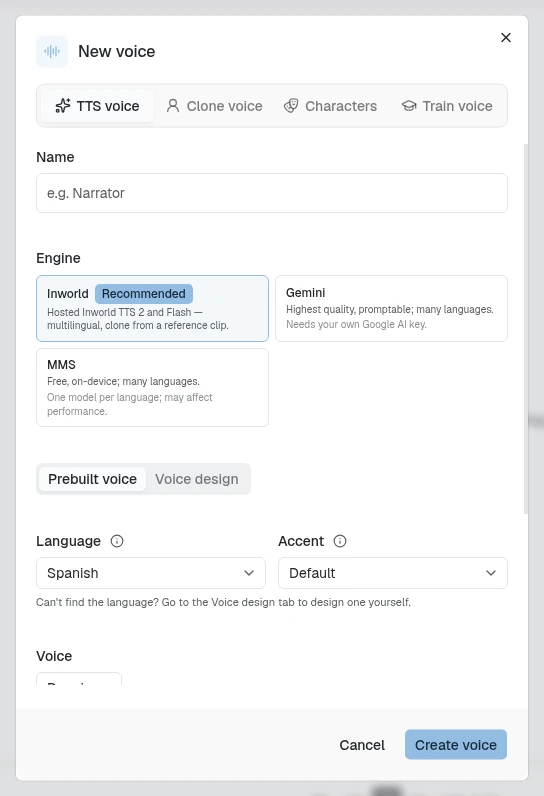
Your project keeps a cast of voices. Each voice is backed by a text-to-speech engine, your choice of:
- Inworld (recommended): hosted Inworld TTS 2 and Flash, no setup and no API key, with named stock voices in many languages and a Voice design mode for building a voice from scratch (see Designing a voice below).
- Gemini: the highest-quality, promptable voices in many languages. It runs on Google’s servers, so it needs your own Google AI key (added in Project Settings).
- MMS: a free, on-device voice model covering many languages, with no key and no connection once it has downloaded. One model per language, so it may affect performance.
A voice can also be a ready-made character voice, which has no engine to choose (see Character voices below).
-
Assign a voice to a cell (or to a character whose lines share a voice), then play a single cell with one click, or queue several cells into a playback queue (the player bar along the bottom) to hear how a passage flows in the target language. Only one thing plays at a time: starting a recording, a preview, or the timeline stops whatever else was playing.
Voices belong to a language
Section titled “Voices belong to a language”On a project with more than one target language, each language keeps its own voices. A voice belongs to the language it was made in, and the Voices list, the voice pickers and Generate show only the voices of the language you have open. Each language also keeps its own cast (which line or character uses which voice) and its own starred default voice, so recasting a line in one language leaves the others alone. Voices made before languages had their own, and the built-in Narrator, show on every language. If you can’t open a language, you don’t see its voices either.
A Maintainer can always create, edit, star and assign voices. A Project lead can too once a Maintainer turns on Project leads can manage voices in Project Settings → Voice, and then only on the languages they can write. That section’s Open Voices button takes you to the cast. Contributors and Viewers can’t manage voices.
Click a line’s voice circle to pick its voice. A line nobody has cast shows an empty dashed ring; hover a circle for who voices it. Picking a voice acts on the line straight away: a cloned or character voice re-voices its take, a stock voice reads an empty line’s text, and a generated take is generated again. It never reads over a person’s recording, and never changes a take that a voice was cloned from. If the line’s take is a person’s recording, the circle names the recording instead of the default voice (“Your recording”, “Recorded by {name}”, or “Original audio” for the imported audio). The last item in the voice list, Add a voice…, opens the New voice dialog on its Characters tab, and the voice you add is cast on that line.
Whenever the line’s voice and the take you hear differ, the top of the line’s Recording tab (and the first item in the take’s menu on the timeline) offers a button: Change to {voice} re-voices the take with a cloned or character voice (see Change voice), and Generate · {voice} has a stock voice read the text as a new take. A stock voice never reads over someone’s recording by itself. While it works, the tab says “Voicing as {voice}…”. On the timeline, a take voiced by a different voice than the line has now says “This take was voiced by {takeVoice}. The line’s voice is now {lineVoice}.”
The Media view has one player, the thin playback strip along the bottom, and playback runs on into the next lines. A take is drawn in the color of its track; change the color from the track’s menu on the timeline.
To give several lines a take each in one go, select them in the Media view and choose Generate voice in the selection bar. Pick the Voice to use, and for lines that already have generated audio, choose Leave them as they are or Generate them again (a new take that plays instead, with the earlier take kept in the line’s history). The dialog estimates the words and credits before you start. Progress shows in the usual banner with Cancel, and any line that fails is named. At least one selected line must be translated.
To voice several lines as one clip, select at least two translated lines in the Media view and choose Voice together in the selection bar (the (i) beside it explains the difference from Generate voice). When the clip is ready, a Split the combined clip by line window shows its waveform with one divider between each pair of lines. Drag a divider (or nudge it with the arrow keys) so each one sits at the end of its line, click a segment to hear just that line, and choose Save splits. The split starts as an even division by text length.
Designing a voice
Section titled “Designing a voice”When you pick Inworld, a Prebuilt voice / Voice design pair of tabs appears. Prebuilt voice lists Inworld’s stock speakers for languages it has them for; if your target language isn’t one of them, a hint points you to “the Voice design tab to design one yourself.” When Inworld has no stock voices for the chosen language, or the voice list can’t be loaded, the voice picker is greyed out rather than offering voices from another language.
Voice design builds a voice from a text description instead of picking a stock speaker, in one of two modes:
- Freeform: describe the voice in a sentence or two (“Write in English. Include age, gender, accent, pitch, pace, and tone…”).
- Structured: a labeled profile (dialect, gender, age, emotion, tone, pitch, volume, speed, clarity, fluency, personality, texture, environment) you fill in field by field, with a reset button if you want to start over.
Either mode starts from a preset chip, Agent, Narrator, Instructor, or Pirate, that fills in a starting description you can then edit. Write a short preview script, click Generate previews, and Aquilla renders three preview clips; play each and pick the one that fits before saving the voice.
Both Prebuilt and Voice design offer the same two knobs: Audio quality (Standard or Highest, cloud rendering with more headroom) and Delivery (More stable, Balanced, or More creative, only adjustable at Highest quality), plus a Talking speed slider. On the Voice design tab these knobs don’t affect the three previews you’re comparing, only the voice as saved; a hint under the sliders says so.
Character voices
Section titled “Character voices”The New voice dialog has a Characters tab beside TTS voice, Clone voice and Train voice. It lists 21 ready-made character voices, women’s, men’s and children’s, young to old, in two columns. Each card shows the voice’s name and vocal range (for example “Hearth Baritone”), and below it sex and age, such as “Male · Middle-aged”. A footnote sums them up: “Synthetic voices — no real person’s voice.” The reader’s words, pronunciation and intonation are kept; only who it sounds like changes.
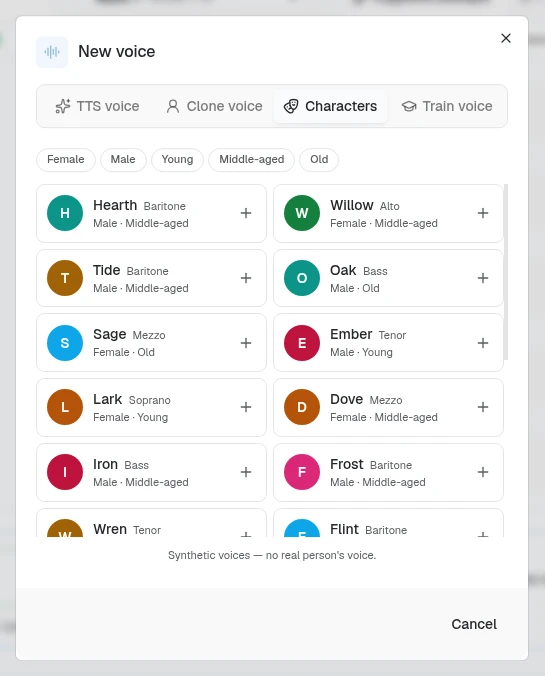
- Filter with the chips above the list: Female, Male, Young, Middle-aged, and Old. Two chips of the same kind widen the list (Young and Old show both), and a sex chip with an age chip narrows it: Female and Old together show only older women.
- Preview a voice by clicking its round avatar, which turns into a play button when you hover it; click again to stop.
- The + in a card’s corner puts the voice in the project’s cast straight away; there is no separate save step. A voice already in the cast shows a ✓ instead. In the cast, character voices are marked Character.
To use a character voice, record the line in any language, then use Change voice to give the take that character’s sound. Generate works too: a stock voice reads the line first, and Aquilla then re-voices that clip into the character.
Editing a character voice opens the same list, with a Name field above it and the current voice marked with a ✓; pick another with its +.
Training a voice from your own recordings
Section titled “Training a voice from your own recordings”The fourth tab, Train voice, makes “A voice trained from a real speaker’s recordings. Ready in about 45 minutes.” Use it for a real actor or narrator whose voice you want across the project.
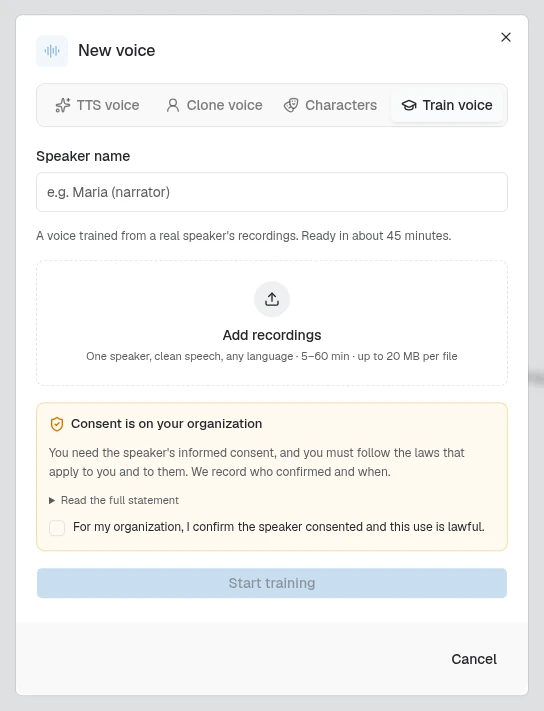
- Speaker name names the voice, for example “Maria (narrator)”.
- Add recordings takes audio files of that speaker, by clicking or by dragging them in: “One speaker, clean speech, any language · 5–60 min · up to 20 MB per file”. Once files are in, a meter shows the minutes so far, such as “9.6 min”, with “15+ min sounds best” beside it. Under 5 minutes it reads “5 min minimum” and training can’t start; over 60 it reads “Over 60 min — remove some”.
- Consent is on your organization. “You need the speaker’s informed consent, and you must follow the laws that apply to you and to them. We record who confirmed and when.” Tick “For my organization, I confirm the speaker consented and this use is lawful.” Read the full statement shows the exact text that is recorded.
- Start training uploads the recordings and starts. Only a Maintainer can train a voice; for anyone else Aquilla refuses to start.
The voice joins the cast at once, marked Training. When it is ready it is marked Custom and works like a character voice, with Change voice and Generate. If training does not succeed, it is marked Training failed. A trained voice belongs to the project that trained it and can’t be used in another project.
The first time you use an in-browser voice, Aquilla downloads its model and caches it; after that, playback works offline.
Offline, a voice from a hosted engine can’t generate: its Generate button is disabled, and clicking it reads “Offline: {engine} needs a connection to generate audio.” If the on-device MMS model has downloaded, the note offers it instead, and an MMS voice still plays as a preview offline. The note then reads “Offline: preview with the on-device voice. The clip won’t be saved.” The batch Generate voice dialog shows “You’re offline. Generating voice for these lines needs a connection.”
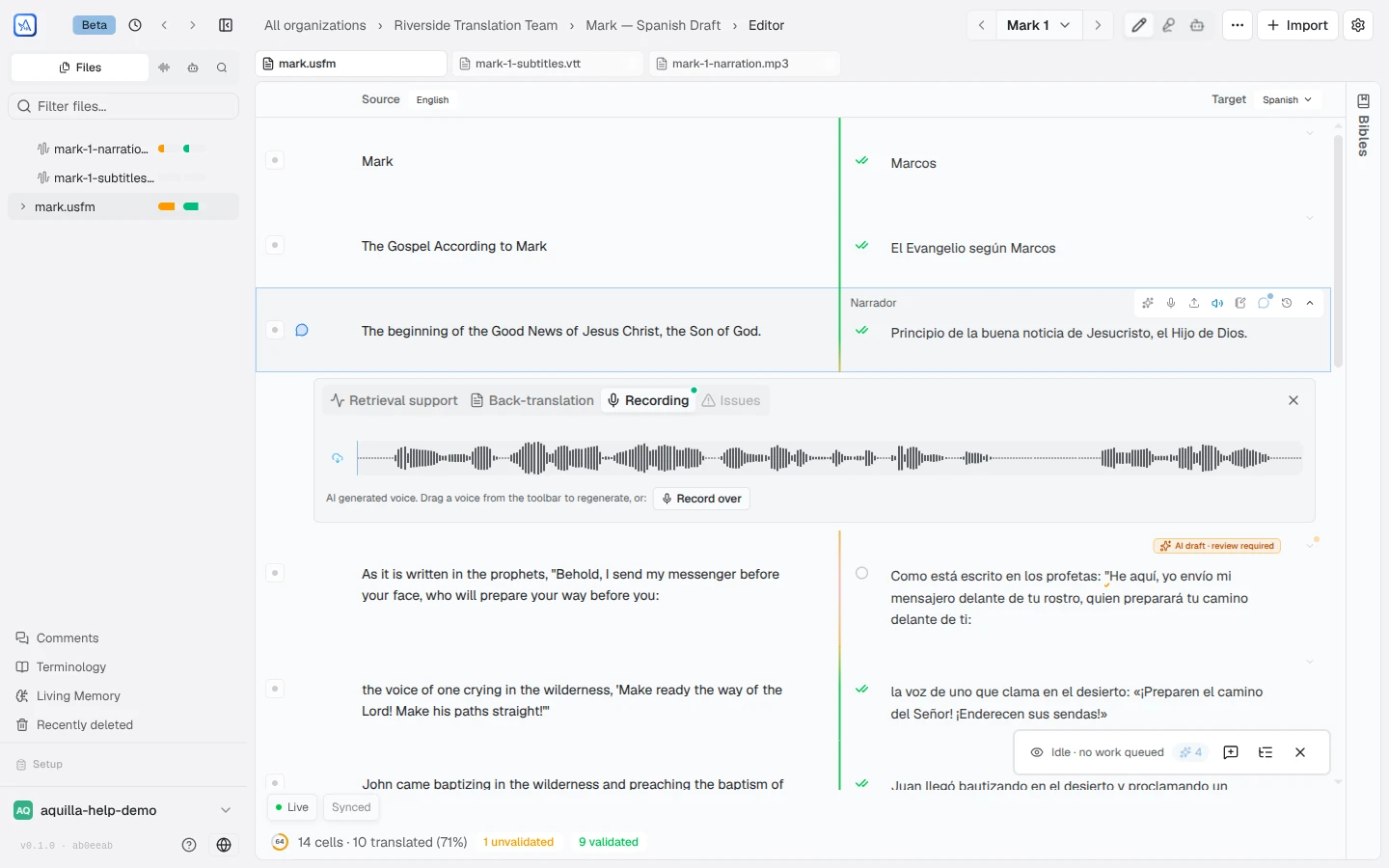
Every cell’s audio also lives in its detail panel’s Recording tab. The tab shows the take that plays, with a scrubber, and a New take button that opens the recorder to record, upload or generate a take. In the Media view, clicking a line opens it on this tab. Below sits a list of the line’s other takes, headed “{count} other take” or “{count} other takes”. A line with no take shows “No take yet”, or “No take plays for this line. Use one below, or make a new one.” when it has takes but none is chosen. From the list you pick the take to use, rename it (Rename take) or delete it, clean one up with Remove noise (adds a cleaned take), or Revert to the original recording. Each take also carries a compact “date · name” tag showing when it was made and by whom. A take saved as a new version in the Station keeps its name, with “· version 2” (or 3, and so on) after it in these lists, and the original stays beside it.
Each recorded take also shows a verdict that compares its transcript with the line’s text:
- Matches the text
- {count} word differs or {count} words differ
- Transcript out of date: the text changed after the transcript was made
- Not transcribed: the take has no transcript yet
- Transcribed: a transcript exists
- No text to compare: the line has no text yet
Generated takes get no verdict. If a take was recorded before the line’s wording last changed, it carries a Text changed badge, unless its transcript matches the line as it reads now. Click the badge to see when it was recorded and what the text read at the time. This is a heads-up, not an error: re-record to match the new wording, or keep the take if you’re intentionally reviewing the older one.
The waveform in the Recording tab, on the timeline, and in the recorder is one shared waveform, so a trim you make in one place shows in the others. It looks the same everywhere, and an AI voice is marked with a single sparkle wherever its take shows. To cut, insert, fade or re-save a recording, click the waveform icon, Edit in the Station, on the take: see The Station. A take’s Make a character from this voice button (also in its menu on the timeline) turns it into a cast voice: see Cloning a voice.
Reviewers can validate a take right from this strip, the same way they validate translated text.
Recording: speech recognition (ASR)
Section titled “Recording: speech recognition (ASR)”You can also record audio and have Aquilla transcribe it:
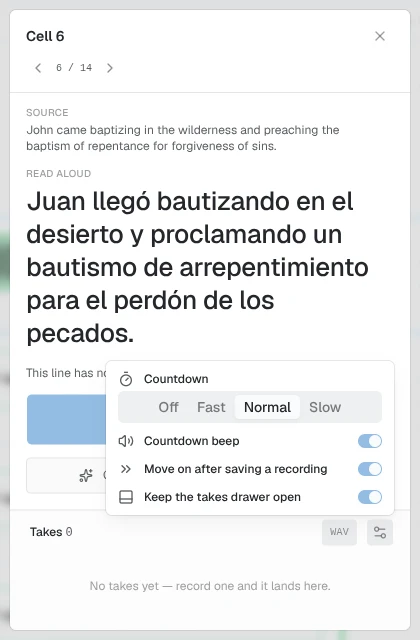
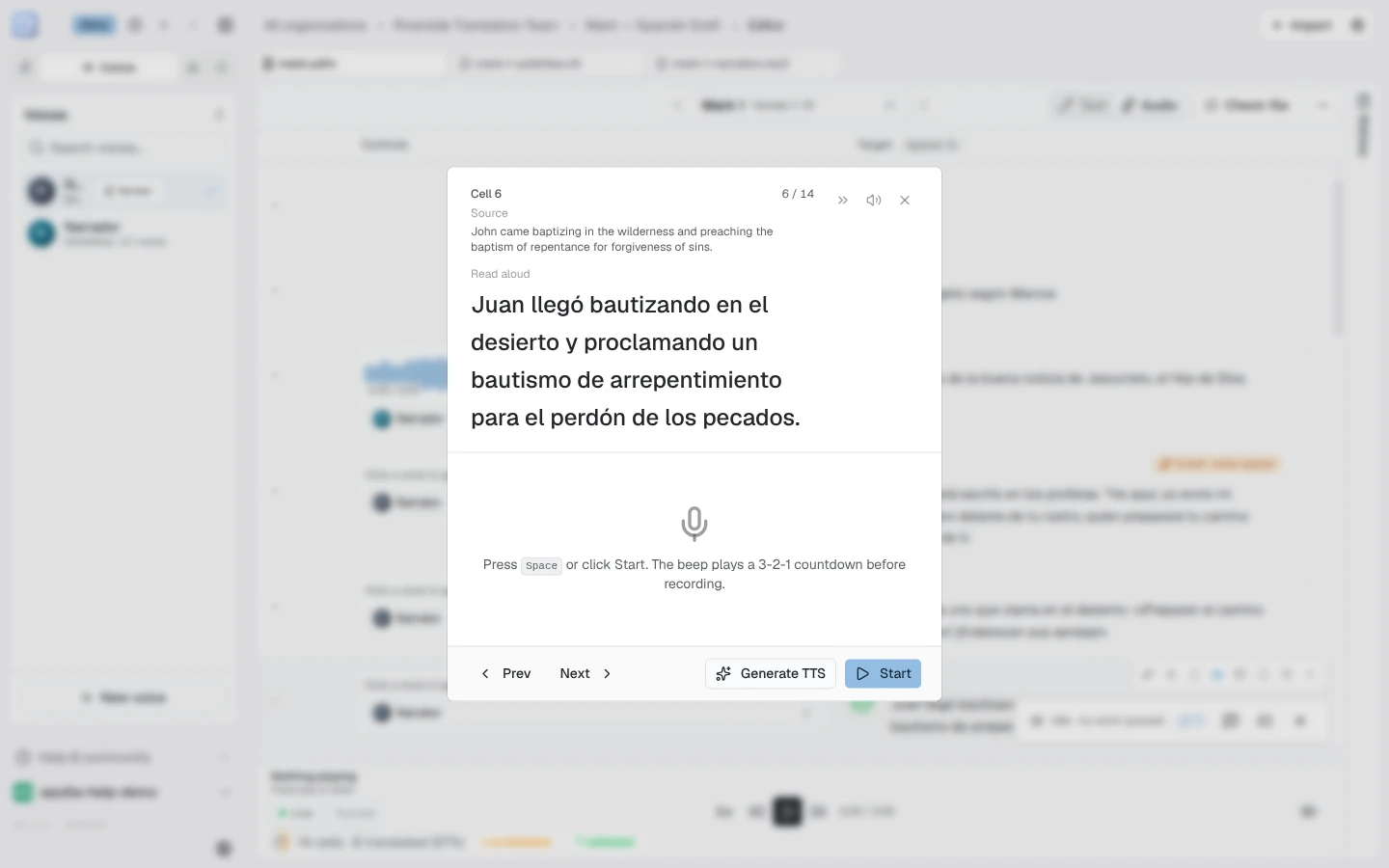
- Choose Record audio on a cell’s action rail (it sits next to the AI buttons) and a guided prompter opens, showing the text to read aloud. Press Space or click Start: a beep and a 3-2-1 countdown lead into recording (the browser asks for microphone permission when the recorder first opens). The recorder’s settings (the gear icon) offer four Countdown speeds: Off, Fast (half a second per number), Normal (one second, the default), and Slow (a second and a half). Choose Off if you’re recording several short takes in a row and don’t need the cue: recording starts straight away, and Countdown beep is greyed out until the countdown is back. The other settings (Countdown beep, Move on after saving a recording, Keep the takes drawer open) are on/off switches; click the (i) beside a row to read what it does.
- When you’re signed in, these settings, the recording format and the film settings follow you to every device. They’re also on the Recording page of Preferences.
- On a line that has a picture, the film sits beside the recorder and plays along with your take and with the preview. It starts muted: the microphone records with echo cancellation off, so on speakers an unmuted film is recorded into your take. Unmute it only on headphones. A take you are recording, and the preview after it, are drawn in the color of the recording track.
-
The source text stays pinned at the top of the recorder while you record, so you can keep reading it as the take runs.
-
Spotted a mistake in the line you’re reading? The pencil beside Read aloud (“Edit this text”) closes the recorder and opens that line’s translation for editing, ready to type at its end, so you can fix it straight away. If you have a take you haven’t saved, Aquilla asks about it first. The pencil shows only when the line has a translation. On a language that delivers only audio, where the recorder shows the source text, there is no pencil.
-
If your browser has blocked microphone access, the record button shows “Microphone access blocked — click for help”: click it for steps to re-allow the microphone in your browser’s site settings, then reload the page.
-
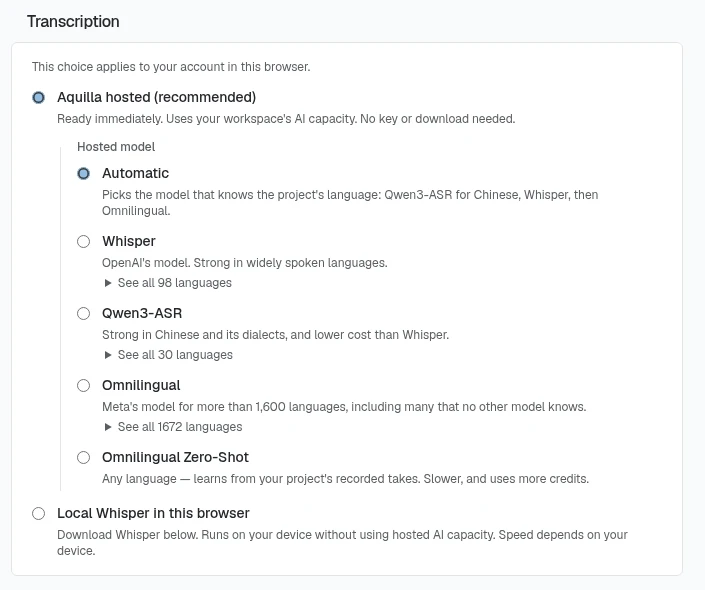
Transcription uses Aquilla hosted (recommended) by default: it is ready immediately, needs no key or download, and uses your workspace’s AI capacity. If the workspace has used up its capacity, you are told to try after the reset, update the plan, or choose Whisper on this device. In Preferences → On-device AI models → Transcription you can instead choose Local Whisper in this browser, which runs on your device without using hosted capacity (speed depends on the device). The choice applies to your account in this browser.
-
Under the hosted option, Hosted model picks which model transcribes:
- Automatic (the default): “Picks the model that knows the project’s language: Qwen3-ASR for Chinese, Whisper, then Omnilingual.”
- Whisper: strong in widely spoken languages.
- Qwen3-ASR: strong in Chinese and its dialects.
- Omnilingual: Meta’s model for more than 1,600 languages.
- Omnilingual Zero-Shot: learns your language from the project’s own recorded and transcribed takes. It is slower and uses more credits, and it needs at least one recorded and transcribed line in the language. Its first use can take a few minutes while the model starts.
Whisper, Qwen3-ASR and Omnilingual each have a See all {count} languages link that lists every language the model knows. An organization can turn off Allow zero-shot transcription under its AI provider keys settings, and then Zero-Shot is not offered.
- The first time you choose local Whisper, a prompt offers the model download and says: “After you save a recording, this device transcribes it automatically.” On a device with no usable graphics card, local Whisper falls back to a slower mode that runs on the processor, rather than showing Failed under Preferences → On-device AI models. Expect longer waits there, not an error.
- With local Whisper, an in-browser speech-recognition model transcribes what you said. This works on a take you’ve only just recorded, too, even offline or before it has synced to the server, so you can record and transcribe in one sitting without waiting for an upload.
- When you transcribe many recordings at once, Aquilla can reach the hosted service’s request limit. The progress banner then reads “Transcription limit reached, continuing at {time}”, and the batch carries on by itself. You don’t need to do anything.
- While it works, a small status badge next to the Transcribe button keeps you posted: a download percentage the first time the model fetches, a transcribing pill while it runs, and a word count when it lands. If something goes wrong you’ll see Transcription failed: click it for the details, with Retry and Dismiss right there. If the hosted model itself isn’t answering, the details read “The transcription model isn’t responding”, and a Change model button opens Preferences → On-device AI models so you can pick another model or transcribe on this device.
- After you record, the waveform shows two trim lines. Drag them to keep only part of the take before you save: a readout shows “{start} – {end} · {length}”, the hint reads “Space plays · drag a line to trim”, and the handles are labelled “Start of the kept audio” and “End of the kept audio”. Reset trim restores the full take. Press Space to hear the take you just recorded (the kept part), and Enter or the Save button (marked “· ENTER”) to keep it. The saved take plays only the kept part, and a take you trimmed is exported the same way, even on a line with no timing. The recorder’s takes drawer lists your takes under the waveform: turn on Keep the takes drawer open to leave it showing, or use Show all takes to bring up the whole list.
- Review the transcript and, if it’s good, accept it into the cell, which queues it as a normal edit. If you fix a mistake instead, Aquilla remembers that correction for the rest of the project, so the same word doesn’t come back wrong the next time you record.
- Prev / Next in the prompter step through the file cell by cell, so you can record a whole passage in one sitting, and you can transcribe several recordings at once when you have a batch.
- You can also upload an existing audio file as a take instead of recording one live. Uploading opens the Takes list so you can see and play the new take right away, on the same line: it never jumps you to the next cell, even if the recorder’s Move on after saving a recording setting does that for a live take you just finished.
Playing back a recording streams: long takes start playing almost immediately and you can jump around within them instantly, instead of waiting for the whole file to download first. Two limits to know about: a recording made in the app can be at most 95 MB, and the recorder stops a take before it gets there. Audio and video files you import can be up to 2 GB; large files upload in parts, so a dropped connection resumes the upload instead of starting over.
The Transcribe view: transcribe, then clean up
Section titled “The Transcribe view: transcribe, then clean up”Speech recognition for a less widely spoken language tends to get the same words wrong again and again. The editor’s Transcribe view, beside Text and Media, works through a file’s recordings in two steps: speech recognition first, then an AI cleanup that learns from the corrections your team has already made in that file.
The view has one row per line that has audio, including lines voiced only by a generated voice. On the left are a play button and Heard, what speech recognition produced (“Not transcribed yet” until it has run); on the right is the editable transcript. Click into a transcript to fix it: Enter saves and Esc puts it back. Empty the transcript and save to go back to the Heard text. The Clear transcription button beside Heard removes both, after asking “Clear what speech recognition heard and the transcript of this line?”, so the line is untranscribed again. While the view opens, it shows “Starting the speech model…” and then “Speech model ready”. A file with no audio shows “This file has no audio yet. Record or import audio, then come back to transcribe it.” Switch to another view and back, and the Transcribe view opens again on the line you were on.

The sparkle on a row (Transcribe and clean up) transcribes the line if it hasn’t been transcribed yet, then sends it to the AI along with pairs of what was heard and what people corrected it to elsewhere in the file, and the language’s key terms. Hold Alt (Option on a Mac) as you click to run speech recognition again from scratch first. A transcript the AI cleaned up, and that nobody has edited since, is marked “Cleaned up · {count} changes”. It uses your workspace’s AI credits. A row can also report:
- Nothing to clean up: the AI found nothing to change.
- Cleanup changed too much: the result added or dropped too many words, so it was not saved.
- No speech heard: speech recognition returned no words.
- Validated takes stay as they are: a validated take is never changed; its sparkle is greyed out.
- AI allowance reached: the workspace’s AI credits are used up.
- Transcription failed, Cleanup failed, or Couldn’t save: the step that went wrong. Click it for the reason.
If you run the sparkle on a transcript someone corrected by hand, Aquilla asks first: “Replace your corrected transcript with an AI cleanup?”
Transcribe all, at the top of the view, runs speech recognition only, with no AI cleanup, on every row that has no transcript yet. It shows “{done} of {total}” and a Stop button.
To clean up several lines at once, tick their boxes (Shift-click ticks a range) and choose Clean up {count} lines. A ticked line with no transcript is transcribed first. If some ticked lines were corrected by hand, Aquilla asks first, for example “2 selected lines were corrected by hand. Replace them with an AI cleanup?” Clear selection unticks them all. The view needs you to be signed in (“Sign in to transcribe”) and able to edit the file.
Changing the voice of a recording
Section titled “Changing the voice of a recording”Change voice keeps a take’s words and timing and makes it sound like the line’s assigned cloned voice or character voice. Nothing is generated from text. When a line’s voice differs from its take, the line’s Recording tab shows Change to {voice}. On the timeline, a take’s right-click menu has Change voice with a quality: Fast, Standard, or High (higher takes longer; see Media view & timing). The original take stays, and the new one plays in its place. The Station’s ⋯ menu has Change the voice… too, which makes the same kind of new version. A stock voice with no reference clip can’t be used: “{name} has no reference clip. Assign a cloned voice to change this take.”
The first Change voice after a quiet spell can take longer while the voice service starts up. If it runs out of time, the message reads “The voice service was starting up” (“It took too long to answer, which usually means it had been idle. Try again; the next one is usually quick.”). Any other failure reads “Voice conversion failed”.
To convert a whole file, the file’s ⋯ menu has Change voice of existing audio. It converts every line to its assigned voice at the quality you pick. Takes already made from the voice’s current reference clip at that quality are left alone, and so is a take a voice was cloned from. The progress banner reads “Changing voices”; when it ends, a message says how many takes changed (“Changed the voice of {count} takes”) and how many cells were skipped or failed, with the reason. On the timeline, the same action sits in a take’s right-click menu: see Media view & timing.
Cloning a voice
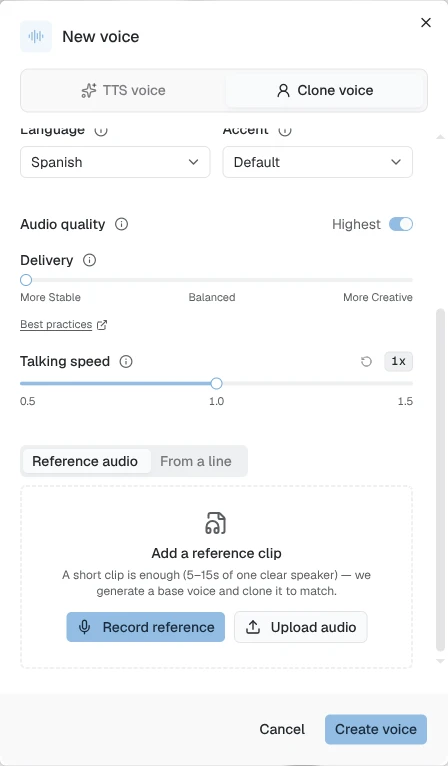
Section titled “Cloning a voice”Beyond the ready-made library, you can give a voice the timbre of a specific person. When you set up a voice for a character, add a reference recording three ways: record a short segment, upload an audio clip, or pick From a line, reusing a take already recorded or generated somewhere in the project. Aquilla re-voices that voice’s text-to-speech output into the reference’s timbre. A voice with a reference attached is marked Clone; leave the reference empty to use the base voice as-is.
To make a voice from a take you already have, choose Make a character from this voice on the take in the line’s Recording tab, or in the take’s menu on the timeline. A small popover, “Make a voice from this take”, asks for a Voice name (filled in with whoever recorded the take), and Add to cast creates the voice: “{name} is in the cast”. More options opens the full New voice dialog instead.
Help assistant
AI answers from the Aquilla docs — may make mistakes.