
Real-time sync & presence
Aquilla is built for teams working at the same time. You see your colleagues’ work as it happens, and your own edits flow out continuously without any “sync now” button.
Presence: who’s here, and who’s editing
Section titled “Presence: who’s here, and who’s editing”Every teammate on a row shows up there, not only the one editing it: a small stack of coloured initials in the row’s target header names everyone who’s landed on that cell, each labelled viewing, editing, or typing…. Whoever is actually typing shows a thin colored cursor with their name, their selection highlighted if they’ve selected text, and a live preview of the words they’re typing that updates as they pause. This presence information means you can spread out across a file without stepping on each other.
The editing state comes from a short-lived focus lock each person’s editor claims on the cell they’re in. The lock releases automatically when they move away, go idle, or disconnect, so it never gets “stuck” on an abandoned cell. Viewing needs no lock: it just means the row is where that person’s cursor or selection currently is, so you see a colleague the moment they land on a cell, not only once they start typing.
Who’s online
Section titled “Who’s online”The workspace shows everyone currently connected as a stack of avatars, labeled “N online.” Click it to open the Online (N) list, where each person is marked editing, viewing, or just online, alongside the verse or reference they’re on when Aquilla knows it. Click a person in the list to jump straight to where they’re working.
The list shows one row per person. If you have the same project open in two tabs, or a colleague is on a phone and a laptop, the row shows their most active state and adds a count such as ×2 in front of it. The small initials on a cell still count each connection separately, so a second tab gets its own cursor and live preview.
On the desktop app, the list disappears while the server can’t be reached, because Aquilla can’t tell who is still there.
Cursors and live typing reach only the people who have the same file open as you. Someone in another file still shows in the Online list, but not on your rows.
How your edits travel
Section titled “How your edits travel”Aquilla uses a live connection (a WebSocket) to a per-project server that handles presence, focus locks, and streaming edits. If your browser or network can’t keep a live connection open, Aquilla falls back to a regular HTTP path so you can keep working, just a little slower.
Either way, your edits are optimistic: they’re saved to your local outbox immediately and reconciled with the server as soon as it confirms them. A short network drop won’t cost you any work.
Reading the sync status
Section titled “Reading the sync status”A status indicator in the workspace tells you where things stand:
- Synced: everything you’ve written has reached the server;
- Queued N: you have edits saved on this device, waiting to send;
- Sync backlog / failed: something is stuck retrying and may need a moment or a reconnect;
- offline: no connection right now; edits are safe in your outbox and will send when you’re back; and
- On device · N (desktop app): you are offline and N edits are saved on this device. Hover over the chip to see when the last upload and download happened.
Checking your connection
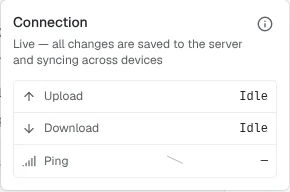
Section titled “Checking your connection”The editor header carries its own smaller sync chip per file, labeled Live, Syncing, Retrying, Reconnecting, Connecting, Paused, Offline, or No file open depending on that file’s own connection. Click it to open a Connection popover with three tiles, Upload, Download, and Ping (rated Good, OK, or Slow), plus a small sparkline of recent ping times.
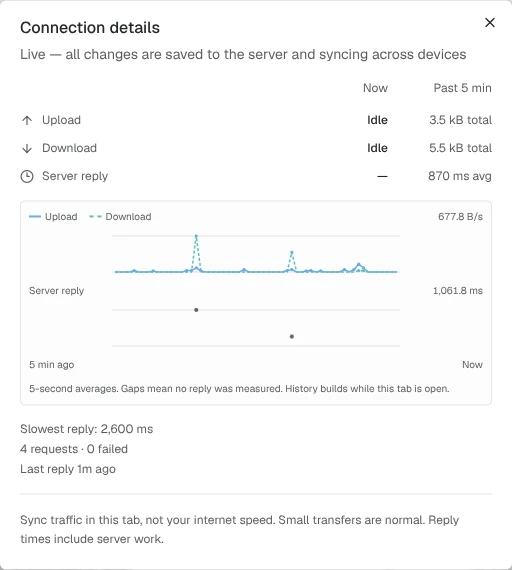
The popover’s (i) button (“Show connection details”) opens a fuller Connection details view: upload and download totals for Now versus the Past 5 min, a Server reply row (average response time, or “Idle” / “Waiting for activity” when there’s nothing to measure yet), and a two-panel history chart of upload/download and server-reply activity over the last five minutes, labeled from “5 min ago” to “Now.” A caption under the chart explains what it shows: “5-second averages. Gaps mean no reply was measured. History builds while this tab is open.” A footer note keeps this in perspective: “Sync traffic in this tab, not your internet speed. Small transfers are normal. Reply times include server work.”
If two people edit the same cell
Section titled “If two people edit the same cell”Presence and focus locks make collisions unlikely. If two edits to the same cell do happen (for example, both made offline), Aquilla doesn’t try to merge the text: the first edit to reach the server becomes current, and the other is preserved in the cell’s history. Nothing is lost.
Help assistant
AI answers from the Aquilla docs — may make mistakes.