
Exporting your work
Your work in Aquilla is yours to take with you. You can export your translated text in several formats, and your terminology separately. For pulling everything your whole organization has stored at once, across every project, see Organization-wide data egress.
Exporting translated text

Section titled “Exporting translated text”Open a file and choose Export from the editor’s More actions menu.
The dialog’s headline action is a primary Download {filename}.{ext}
button: your file back in its original format (USFM, Word .docx, or
PowerPoint .pptx) with your current translations injected, one click.
For a file imported as subtitles, the dialog leads with two sections instead
of one, and only one is open at a time: Audio (By character or
By line, both .zip, or By chapter, one .wav per chapter, described
under Chapter audio) and a subtitle/audio-VTT section offering the
translated lines or, if the file has a linked audio track, the heard lines
instead (“what was actually said, for checking the dub against the
picture”). The dialog remembers which section you had open and your format
choices for that project, in your browser. See
Dubbing & characters for the full
dubbing export workflow.
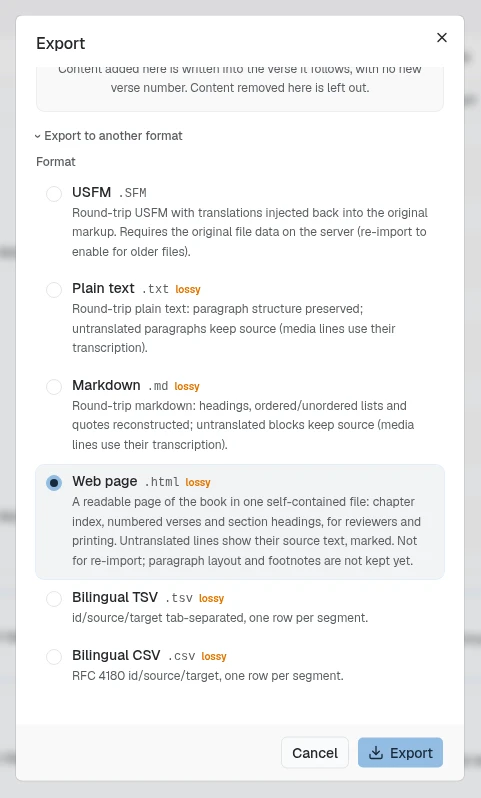
To convert to a different format instead, open the dialog’s collapsed
Export to another format section and pick a format, a scope (Current
file or Whole project), and a filename. For most text and table
formats, scoping to the current file also offers a chapter picker,
defaulting to All chapters: pick one (for example GEN 1) and the
export includes only that chapter’s cells, with the chapter name added to
the file’s name. USFM, Word, PowerPoint, and the other formats that reinject
translations back into your original document don’t offer this picker; they
always export the whole file. With Whole project, the filename can’t be
edited: “Project-scope exports use the project name.”
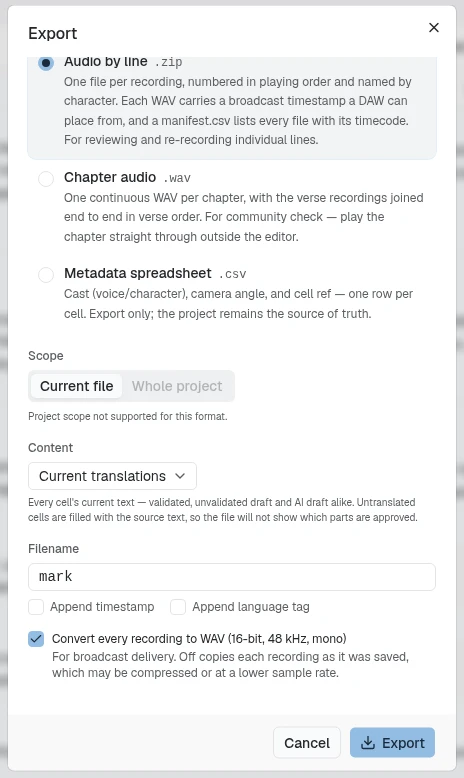
Every export also carries a Content choice: Current translations (the default) or Validated translations only. The default’s hint spells out the trade-off: “Every cell’s current text — validated, unvalidated draft and AI draft alike. Untranslated cells are filled with the source text, so the file will not show which parts are approved.” Switch to Validated translations only and, for the formats above that build a fresh file, the hint changes to “Only cells that meet this project’s validation threshold. Everything else is left out — no unreviewed drafts and no source-language filler.”; for USFM, Word, PowerPoint, and IDML, which reinject into your original document, it reads “Only cells that meet this project’s validation threshold are written into your original document. Anything else keeps the words already in the file you uploaded.” A count under the picker shows exactly how much that means for the file you have open, for example “12 of 49 cells in this file are validated.” The dialog doesn’t remember your last choice: it opens back on Current translations every time.
| Format | Good for |
|---|---|
USFM (.SFM) |
Scripture markup for typesetting and publishing pipelines, with translations injected back into your original markup. |
Word (.docx) |
Translations injected back into the original Word document. Paragraph and heading structure, and the translator’s inline formatting (bold, italic, and so on), are preserved. Only available for files that were imported as .docx. |
PowerPoint (.pptx) |
Translations injected back into the original PowerPoint deck. Only available for files that were imported as .pptx; files imported before PowerPoint export existed need a re-import to enable it. |
JSON (.json) |
Translations written back into the original JSON document at the keys you chose when importing. Every other key, value and nesting level is preserved. Only available for files that were imported as JSON; older files need a re-import to enable it. |
Plain text (.txt) |
A simple, readable dump of the target text. |
Markdown (.md) |
Lightly formatted text. |
Web page (.html) |
One readable page of the book in a single file, for reviewers without the app and for printing: a chapter index, numbered verses and section headings, titled with the book’s name (or the file’s, if no verse reference can be read). It keeps the book’s layout: paragraphs, poetry lines and their indents, blank lines, the words of Jesus, and footnotes and cross-references, listed under each chapter. Untranslated lines show their source text, greyed and in italics, and the footer counts them. Not for re-import. Offered for USFM files and for Bible books migrated from Codex. With Whole project, you get one zip with an index.html and a page for each Bible book, named in Bible order (01-GEN.html, 40-MAT.html); files that aren’t Bible books are skipped and counted in the message when it finishes. |
| Bilingual CSV / TSV | Source/target tables for spreadsheets. |
XLIFF 1.2 (.xlf) |
Round-tripping with other CAT tools. |
TMX 1.4b (.tmx) |
A translation memory of your source/target pairs. |
SRT / WebVTT (.srt, .vtt) |
Subtitle tracks with timed cues; WebVTT carries cast voice tags. |
Audio by character (.zip) |
One WAV per character, with every take at its own place on the timeline and silence in between. All files start at 0:00, so they drop onto a DAW already aligned with each other and with the film. Each take is written at its own volume and fades from the Station. |
Chapter audio (.wav) |
One continuous WAV per chapter, verse recordings joined end to end in verse order, for playing a chapter straight through outside the editor, with each take at its own volume and fades. See Chapter audio. |
Audio by line (.zip) |
One file per recording, numbered in playing order and named by character, each carrying a broadcast timestamp a DAW can place from, plus a manifest.csv listing every file with its timecode. For reviewing or re-recording individual lines. Tick Convert every recording to WAV (16-bit, 48 kHz, mono) for broadcast delivery; unticked, each recording is copied as it was saved, except a take with its own volume or fades from the Station, which is always written as WAV with them applied. The dialog remembers your choice. |
Character sheets (corrected) (.xlsx) |
Both character spreadsheets (subtitle and audio) back in their original columns, with every resolved disagreement applied. Lines still in dispute go back exactly as they came. See Dubbing & characters. |
Project report (.html) |
One document for the whole project: open character disagreements, what’s recorded and what isn’t, cues with no subtitle behind them, the timing correction each episode was imported with, characters spelled more than one way, and any episode that couldn’t be read. |
Metadata spreadsheet (.csv) |
Cast, camera angle, and cell reference: one row per cell. |
SDBH XML (MARBLE) (.XML) |
Localized lexicon reinjected into the original MARBLE XML edition. Only shown for projects with SDBH lexicon files, and always a whole-project export. |
Recordings nobody has validated
Section titled “Recordings nobody has validated”When the open file would export a recording that nobody has validated, an
amber note appears in the Audio section, before you export. With Current
translations it reads, for example, “2 lines will export recordings nobody
has validated.” The note never blocks the export. Under it, each of those
lines has its own small pill: a scripture line shows its reference (for
example JHN 6:5), and any other line shows its number, such as L3, the
way Audio by line numbers its files. Click a pill to close the dialog and go
to that line. Past eight lines, the first eight show with a “+N more” pill that
opens the rest in place.
Choose Validated translations only and the note changes to, for example, “2 lines have no validated recording and will be left silent.”, with the same pills under it. What “silent” means depends on the format:
- Audio by line: the line gets no file in the
.zip, the same as a line nobody recorded. - Audio by character: the take is left out of the character’s track. The gap stays in place and every other take keeps its position.
- Chapter audio: the chapter file holds a gap as long as the withdrawn take, so the chapter keeps its length.
Chapter audio
Section titled “Chapter audio”Chapter audio turns the recordings you already have into one file per chapter, so a community reviewer can press play once and hear the chapter through. It joins each verse’s selected recording in verse order, skips verses with nothing recorded, and adds no silence for the gaps. Under the format, a line such as “12 verses recorded · 2 chapters” shows what you will get; if nothing is recorded, it says “Nothing is recorded yet, so there is nothing to export.” While it works the dialog shows “Stitching chapter audio…”, and it ends with “Exported 2 chapters as continuous audio files.”
The Include chapter headings checkbox is off by default. Ticked, “Adds each heading’s recording to its chapter file, in reading order.” Unticked, the files hold verses only. The dialog remembers your choice with the rest of its settings. For a file imported as subtitles, the same option is By chapter in the Audio section. Chapter audio exports one file at a time.
Cells export in order, each carrying its canonical reference label (for
example GEN 1:1). USFM, Word, PowerPoint, WebVTT, and
audio-by-character export one file at a time; the text and table formats, and
Web page, can also export a whole project at once.
Two flags in the dialog are worth reading rather than fearing: formats that can’t carry everything are badged lossy, with a “What this loses:” note naming exactly what drops, and a file with outstanding validation flags shows a notice that they “won’t block your export — download now and resolve them anytime.”
Exports are a live snapshot: they always reflect the current state of the project at the moment you export, and each export is timestamped. There’s no separate “publish” step that freezes a version.
When an IDML export can’t finish
Section titled “When an IDML export can’t finish”IDML export checks that every translation can be placed safely in your InDesign layout before it writes anything. If it can’t, the dialog shows why, with two buttons:
- Download original unchanged saves the IDML file you imported, as it was.
- Repair a copy reads the stored original again and builds a new file beside the old one, named for example “Isaiah (repaired)”, with each existing translation copied onto the line with the same source text. Repeated lines keep their own translations. The dialog shows “Repairing a copy of {fileName}…” while it works and ends with “Created {fileName}. The original file was left unchanged.” If some translations could not be paired, it says how many, and those stay on the original file. If the file has no stored original, it reports “This file has no original IDML package to repair from.”
Repair a copy needs import permission; without it the button is greyed out.
Hidden cells in exports
Section titled “Hidden cells in exports”Cells hidden with Hide cell (see Editing cells) are left out of exports. When the open file has hidden cells and you pick a format that reinjects into your original document, the dialog adds a note:
- USFM, Word, PowerPoint: “Cells hidden here are left out.” (Word and PowerPoint files imported before Aquilla recorded paragraph positions keep the original text instead, as IDML does below.)
- IDML and SDBH XML: “Cells hidden here can’t be dropped from this kind of file, so they keep their original text — they carry no translation.” If you hand this file to a typesetter, know that the parked text is still in it.
Formats that build a fresh file (plain text, Markdown, CSV, TSV, XLIFF) simply do not contain hidden cells, so they show no note.
Exporting terminology
Section titled “Exporting terminology”A project’s terminology can be exported to TBX (the standard terminology-exchange format) or CSV, so you can move your termbase into other translation tools or share it across projects. The TBX file holds the renderings for the lane you have open; export once per lane to get each language.
Help assistant
AI answers from the Aquilla docs — may make mistakes.